
Accessing Call Logs for Call Traffic
1
Log In
On the main log-in screen, scroll to find the telephone number you need to adjust
On the Actions dropdown arrow next to the telephone number, select “View Individual Settings”
Warning: Do not choose the “Reset Line” option as ALL settings for the phone will be wiped out. If a business group administrator does this, there is a $37.50 reprogramming fee billed to the account.
2
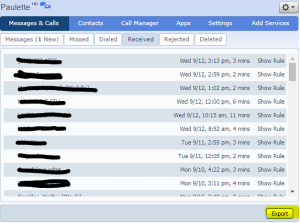
Click on the Messages & Calls tab

3
Export
Click the Export button to export data as shown
4
Settings
Check the boxes for the information you are interested in exporting – in the case pictured, we export the information on incoming received calls.

5
Finish
The file will then open in Excel and you can view and sort the data for your purposes.
When completed, select “Logout” from the tools dropdown in the upper-right of the page.
Support
For additional help, contact our support team at 218-454-1234.
