
Rebooting Your GigaCenter Router
Standard reboot
1
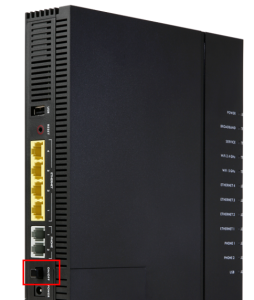
Locate Power Button
Find near the bottom of the left-hand side of the unit just above the power cord.
2
Click Power Button
Wait 30 seconds after pressing.
3
Click Power Button (again)
This will cause the unit to reboot.
Forced reboot
If the first method did not work, use this method for force the unit to reboot.
1
Unplug Power Cord
Located near bottom of left-hand side of unit.
Wait 30 seconds before reconnecting power.

Do not push the “RESET” button on your unit. This will factory reset the device and will require you to contact our tech support team to reconfigure your unit. If you hit this button by mistake please call us at 218-454-1234.

