
Rebooting TV Equipment
1
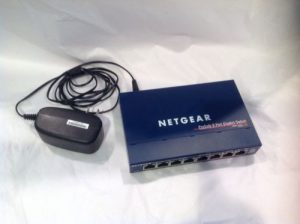
Reboot Switch
Locate the dark blue Netgear switch and unplug the black power connector.
Wait 10-15 seconds and reconnect the power cord.
Note: Not all TV setups will have a switch installed; if this does not apply to you, skip this step.
2
Reboot Set-Top Box
Unplug the black power connector from the back-right side of the set-top box.
Wait 10-15 seconds and reconnect the power cord.
The set-top box will take 1-2 minutes to reboot.
After reboot, the TV should display a welcome screen for no more than 1 minute before displaying TV content.

If the following occurs after following the above steps, call 218-454-1234
- If the cable box stays on the welcome screen for more than 1-2 minutes
- If the cable box displays a gear
- If the cable box displays a red “X” on the screen
- If the cable box displays a blue “X” and a “The television signal has been lost” message for more than 1 minute after rebooting
- If the cable box has no lights or is not displaying anything on screen
