
Set-top Box Set Up – Cisco
Contents
Your set-top box (STB) should include:
- Cisco STB
- Power cord
- CTC remote
Set Up Instructions
1
Connect Power
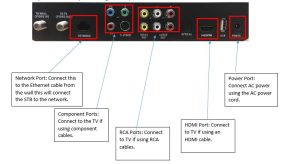
Connect the power cord to the wall and the power port on the set-top box.
2
Connect Ethernet
Connect the Ethernet cable to the network port on the STB. Connect the other end to your switch/router.
3
Connect STB to TV
Connect the STB to your TV with video/audio cables.
You may use RCA, Component, or an HDMI cable. Reference photo for details.
4
Power On
Press the power button to start your set-top box.
Support
For additional help, contact our support team at 218-454-1234.
