
Programming at CTC Arris Remote to Your TV
Arris remotes can be programed to most TV’s following the quick programing steps in this article. If you don’t have an Arris remote click here to view programing instructions for our Cisco/M remotes.
1
Get TV Code
Locate your TV’s code in the adjacent table and not it for Step 6 before you start the programming process.
The steps must be done in fairly quick succession or the remote will time-out of programming mode.
| TV Code | TV Make |
| 1 | Insignia / Dynex |
| 2 | LG |
| 3 | Mitsubishi |
| 4 | Panasonic |
| 5 | Philips / Magnavox |
| 6 | Samsung |
| 7 | Sharp |
| 8 | Sony |
| 9 | Toshiba |
| 10 | Vizio |
Note: If your TV make is not listed above, please call our support team at 218-454-1234.
2
Locate Setup Key
Locate the setup key on your remote.
This can be found in the middle of the remote, above the Up arrow key.

3
Press & Hold Key
Press and hold the Setup key until one of the mode keys (STB, TV, DVD, AUX) at the top of the remote blinks twice.

4
Select TV Mode Key
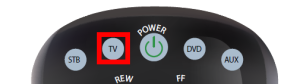
5
Aim Remote at TV

6
Press and Hold Key
Press and hold the number key that corresponds with the TV code you noted from Step 1.
The TV will start to test codes.
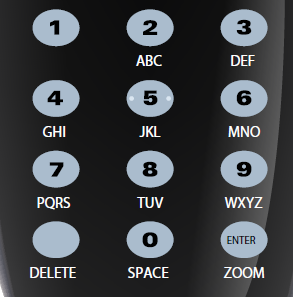
As soon as your TV turns off, release the number key you were holding.
7
Your Programming is Complete!
Support
For additional help, contact our support team at 218-454-1234.
